Showing posts with label Android. Show all posts

Tuesday, July 28, 2020

Trying Things Out on An Airplane.

I finally did it. I have an ESP32 talking to a thermocouple connected to a Lycoming O-360!

I am using bayonet K type thermocouples, on the CHT ports built into the cylinder heads of the engine. They are in a 3/8-24 hole that is about 2 inches deep on the bottom of the cylinder near the bottom spark plug.

This is cylinder 1 near the prop. The bayonet adapter is the shiny metal part, just below the sparkplug. The tube on the left is the intake for the cylinder.

The temperature measurement is working, and seems pretty accurate. For now it is only reading one thermocouple, since that is all I have. I am using the MAX6675 Arduino module available from all the usual outlets for about $5 each. I have 4, but one isn't like the others, and doesn't seem to work. I'll have to order a couple more.

I only have one of these thermocouples, but I have 4 on order. The thermocouple I have only has about and 18inch wire coming out of it. The thermocouples I have on order have 3 meter wires, and should be more suitable for mounting the control box on the firewall.

The ESP32 controller I have now was hanging down between the USB cord and the thermocouple wire. It isn't suitable for use during the engine run. I ran the engine for about 3-4 minutes to get it up to about 200degrees F. I do have 2 sparkplug ring type thermocouples connected to an analog gauge that I can use while the engine is running. I can only read one CHT and EGT at a time, using a rotary switch.

After shutting down the engine, and ensuring all switches were off, I connected the esp32 to a laptop, and the thermocouple to the bayonet adapter. Then I used the Arduino serial monitor to read the output of the serialthermocouple example program that is available with the Adafruit MAX6675 library. The only changes I needed to make to the example program was tell it what pins the three SPI wires connect to.

A screen shot of the Arduino Monitor compares well with the analog gauge:

About 180-190 degrees F showing, while looking at cylinder 4 the opposite of cylinder 1 where the ESP32/MAX6675 was connected. (A Lycoming O-360 is a 4 cylinder boxer type engine, with cylinders 1 and 3 on onside of the engine and cylinders 2 and 4 on the other side of the engine).

The breadboad has expansion capabilities for up to 4 of these MAX6675 modules, a couple voltage dividers allowing the Oil and Fuel pressure analog sensor readings. The ESP32 WROOM module has capabilities for multiple SPI devices, all the analog readings that I may want, and more. It can do bluetooth, or WiFi.

As I work on this, I will add connectors for the additional modules. The USB connector is used for power and data transfer now. When I mount this in the airplane, I will supply power to the 5V input pin, and only use the USB connector for programming.

One thing I learned, the breadboard I bought was a terrible choice. There are a set of buses running the full length of the board. I need to cut traces like crazy. I forgot to cut the traced in the middle of the ESP32, and when I first powered it up, I could smell something. I hadn't soldered each pin in the socket, so I am sure that saved me, but a few power and ground pins ran into each other or other pins.


The scratches in the middle of the socket are where I needed to break the traces. I have to isolate the pads for the MAX6675 adapters since they are arranged longitudinally.

I've added the capability to display the temperature output via Bluetooth. The code is 90% the example code modified to output Bluetooth.


// this example is public domain. enjoy!
// https://learn.adafruit.com/thermocouple/
//
// Modified to output Bluetooth

#include "max6675.h"
#include "BluetoothSerial.h"

int thermoDO = 12;
int thermoCS = 14;
int thermoCLK = 27;

MAX6675 thermocouple(thermoCLK, thermoCS, thermoDO);

float tempC, tempF, tempK;
char *titleTemp; 

BluetoothSerial  SerialBT;

void setup() {
  Serial.begin(115200);

  SerialBT.begin("ESP32_EngMon");    // Pair to this device

  Serial.println("MAX6675 test");
  // wait for MAX chip to stabilize
  delay(500);
}

void loop() {
  // basic readout test, just print the current temp
  
   tempC = thermocouple.readCelsius();
   tempF = thermocouple.readFahrenheit(); 
   Serial.print("C = ");
   SerialBT.print("C = ");
   Serial.println(tempC);
   SerialBT.println(tempC);
   Serial.print("F = ");
   SerialBT.print("F = ");
   Serial.println(tempF);
   SerialBT.println(tempF);
   
   // For the MAX6675 to update, you must delay AT LEAST 250ms between reads!
   delay(1000);
}


The output can be displayed on an Android device using the Bluetooth Terminal application available from the playstore.


Until next time...


Tuesday, November 17, 2015

Form Over Function

I know I have railed against this before, but it seems to be getting worse. My examples are Android specific in this blog, not because they are the worst, but because I am most familiar with these apps. Microsoft has and continues to do it, along with Apple and most other software companies. Putting the looks of an app ahead of it's functionality is a disservice to the users.


There certainly is a place for consistent user interfaces. It is really nice that most apps have a file menu, edit menu and view and ... usually ending with help. It makes switching between apps pretty straight forward. Then Microsoft went to the "Ribbon" look and took all that away.  Some people say it improved their productivity, and I might argue it does, for the people who stick to a few apps. Most people though, use multiple apps all day doing this or that.

I am a long time Emacs user. Forever and ever people have been telling me that it is hard to learn, so they stick to whatever editor they like. Right, Emacs is really hard to learn, but after 20 years, I know it too well, and can't teach it. All the commands are muscle memory, I usually don't even know what keys I am pressing. The keys are grouped, so there is consistency when going from one group to another. I am really fast at using emacs, and I credit that for giving me the edge when I get work done quicker than others might.

The trouble comes when people take perfectly fine apps and try to apply another paradigm to them. Microsoft did it with the ribbon. I am sure it helps people who use Word all day long, but for people who switch between Word and Project and Acrobat, it is frustrating. Occasional users will find unfamiliar UIs confusing no matter how hard people say they are easier. Windows 8 might have been a fine UI if it was the first UI anyone had tried to use. People who had been using every other UI since about 1980 will find Windows 8 home screen jarring.

In the last year or two Android has tried to get all apps to use the Material Design concept. Apps that were working fine in their own look and feel are suddenly changing to the new Material design look. The look I don't much care for, but also the functions that an app may have had are suddenly gone. Sometimes it is spacing, sometimes it is a misinterpretation of the design language, sometimes it is some unknown reason.

A perfect example of this was the Google Calendar. It was a really nice app, and then is got "Materialed". In the first iteration, there was no longer a month view, and weeks were chopped off at 5 days. They added a summary view, where the appointments that are happening soonest would show in a list. The summary view is common in some calendars, so this was a nice addition. Missing the weekends or the month view was really frustrating. Eventually weeks became 7 days, and months could be viewed, but by then I and many others had switched to Sunshine calendar or aCalendar and never looked back. It damaged Google's reputation.

Android developers are encouraged to make their apps follow the Material design language. This guide changes occasionally, so tracking the latest guidelines can add work for a small time developer. Some of the guidelines aren't clear, or there are questions how some guidance applies to a certain paradigm. One app may feel the guidance says do function X this way, where a competitor feels the guidance says to the same function another way.

I find the floating buttons are in the way many times. The circle + in gmail is in the way more often than I care for. I find other apps that use floating buttons are equally in the way. There are ways to do things different, but the Material design guidance doesn't mention them.

Colors and Such


There are many studies on Human Computer Interaction (HCI) that offer clear recommendations on color. Many apps are getting it wrong, but people claim the apps are "beautiful". Again, there are ways to make an app "beautiful" and functional.  The Material design guide follows most of the HCI recommendations, but the words do not.

A big thing is I've been told forever in UI design is avoid saturated colors. Back in the early days with 8 and 16 bit screens, the colors were limited. There were only a handful of colors, and to convey information, they needed to be done as best we could. Sometimes older interfaces look primitive or cartoon like. With fewer colors, the choice included many saturated colors. Today, we have millions of colors to choose from, and we can convey more information using more of them.

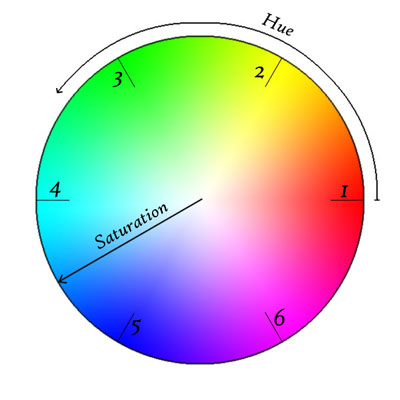
What is a "saturated" color, and why should they be avoided?


Looking at a color wheel, the saturated colors are the ones on the outside.
Looking at the wheel from farther away, the eye can see little triangles at the numbers. The colors are different through these triangles. The colors are indistinguishable when placed near each other. Placing a color in the 6 area next to a color in the 3 will certainly contrast, but that would be very jarring. Moving in from the edge a little, maybe 20% of the way in from the edge, the colors are less saturated, and the colors are more distinguishable. Selecting 2 greens in this area will likely be visible to the eye, and allow the users to distinguish between information presented using these colors.

There are theories about how to mix colors, using complementary and analogous colors. Following these theories can prevent users from feeling their eyes are assaulted. There are ways to use colors to set moods and to convey a sense of importance to information.  

There are tools on the web for selecting colors to provide the right look. Many of the tools will put the basics there, and offer the chance to blend them to get the unique look desired. 

Changing UIs

The best way to change what users like is to do it gradually. Never remove a feature. Emacs is a great example. Moden Emacs UI's include the familiar File menu, Edit Menu, ... ending with help. All the keyboard commands still work, and I can turn off the tool bar to get more edit space on my screen. All of the macros are available, and there are more, some I discover new. Adding functions is a good thing, but don't force the users to use them. The users know their tool/app and use it their way, maybe not the way it was designed, but certainly in a way that suits them 

The user looks at an application as a tool. They have a problem and they need a solution. If your tool doesn't meet their needs, they will find another tool that does suit it. Maybe Excel wasn't intended to be a word processor, but some people will insist on using it to edit blocks of text. Let the user find the tool that suits them.

What is your favorite tool that someone has destroyed making it "better"?

Thursday, August 13, 2015

Garage Project Update

I completed this a couple months ago. I just didn't get to posting it. Check out the other posting if you want to know what this is updating.  Of course, I updated the GUI, so it isn't just "Big Door", "Little Door" and made the app a little more robust. It remembers the last Bluetooth device, so pairing is a little more automatic. The change to the GUI allows users to click on the door they want open, and it opens. Someday, I may put in sensors so the GUI could show the current state of the doors (so when I go to bed, I can look, and know if I left any doors open). The app inventor project is at this link.


 I re-did the wiring in the garage as well. I used to have a spiderweb in the ceiling with droopy wires from the access door to the openers. Who ever installed the openers or the wiring must have run out of staples, and there were like 3 for the two openers. Now all the wiring goes through the attic, with the central wiring on a barrier strip.

The sketch I didn't change, but I noticed I didn't upload that either. I'll give that a go as well. The sketch isn't doing anything really complex. It is still based on ardudroid.


/*
 PROJECT: Garage 
 PROGRAMMER: T Brusehaver
 DATE: May 31, 2015
 FILE: garage.ino
 LICENSE: Public domain
*/

#define START_CMD_CHAR '*'
#define END_CMD_CHAR '#'
#define DIV_CMD_CHAR '|'
#define CMD_DIGITALWRITE 10
#define CMD_ANALOGWRITE 11
#define CMD_TEXT 12
#define CMD_READ_ARDUDROID 13
#define MAX_COMMAND 20  // max command number code. used for error checking.
#define MIN_COMMAND 10  // minimum command number code. used for error checking. 
#define IN_STRING_LENGHT 40
#define MAX_ANALOGWRITE 255
#define PIN_HIGH 3
#define PIN_LOW 2

String inText;

void setup() {
  Serial.begin(9600);
  Serial.println("Garage By T. Brusehaver (2015)");
  Serial.flush();
}

void loop()
{
  Serial.flush();
  int ard_command = 0;
  int pin_num = 0;
  int pin_value = 0;

  char get_char = ' ';  //read serial

  // wait for incoming data
  if (Serial.available() < 1) return; // if serial empty, return to loop().

  // parse incoming command start flag 
  get_char = Serial.read();
  if (get_char != START_CMD_CHAR) return; // if no command start flag, return to loop().

  // parse incoming command type
  ard_command = Serial.parseInt(); // read the command
  
  // parse incoming pin# and value  
  pin_num = Serial.parseInt(); // read the pin
  pin_value = Serial.parseInt();  // read the value
  
  Serial.print("Ard_command ");
  Serial.print(ard_command);
  Serial.print("  Pin=");
  Serial.print(pin_num);
  Serial.print("  Val=");
  Serial.println(pin_value);

  // 1) GET TEXT COMMAND FROM ARDUDROID
  if (ard_command == CMD_TEXT){   
    inText =""; //clears variable for new input   
    while (Serial.available())  {
      char c = Serial.read();  //gets one byte from serial buffer
      delay(5);
      if (c == END_CMD_CHAR) { // if we the complete string has been read
        // add your code here
        break;
      }              
      else {
        if (c !=  DIV_CMD_CHAR) {
          inText += c; 
          delay(5);
        }
      }
    }
  }

  // 2) GET digitalWrite DATA FROM ARDUDROID
  if (ard_command == CMD_DIGITALWRITE){  
    if (pin_value == PIN_LOW) pin_value = LOW;
    else if (pin_value == PIN_HIGH) pin_value = HIGH;
    else return; // error in pin value. return. 
    set_digitalwrite( pin_num,  pin_value);  // Uncomment this function if you wish to use 
    return;  // return from start of loop()
  }

  // 3) GET analogWrite DATA FROM ARDUDROID
  if (ard_command == CMD_ANALOGWRITE) {  
    analogWrite(  pin_num, pin_value ); 
    // add your code here
    return;  // Done. return to loop();
  }

  // 4) SEND DATA TO ARDUDROID
  if (ard_command == CMD_READ_ARDUDROID) { 
    // char send_to_android[] = "Place your text here." ;
    // Serial.println(send_to_android);   // Example: Sending text
    Serial.print(" Analog 0 = "); 
    Serial.println(analogRead(A0));  // Example: Read and send Analog pin value to Arduino
    return;  // Done. return to loop();
  }
}

// 2a) select the requested pin# for DigitalWrite action
void set_digitalwrite(int pin_num, int pin_value)
{
  switch (pin_num) {
  case 13:
    pinMode(13, OUTPUT);
    digitalWrite(13, pin_value);  
    // add your code here      
    break;
  case 12:
    pinMode(12, OUTPUT);
    digitalWrite(12, pin_value);   
    // add your code here       
    break;
  case 11:
    pinMode(11, OUTPUT);
    digitalWrite(11, pin_value);         
    // add your code here 
    break;
  case 10:
    pinMode(10, OUTPUT);
    digitalWrite(10, pin_value);         
    // add your code here 
    break;
  case 9:
    pinMode(9, OUTPUT);
    digitalWrite(9, pin_value);         
    // add your code here 
    break;
  case 8:
    pinMode(8, OUTPUT);
    //digitalWrite(8, pin_value);
    // add your code here 
    digitalWrite(8, HIGH);   // sets the LED on
    delay(1000);                  // waits for a second
    digitalWrite(8, LOW);    // sets the LED off
    break;
  case 7:
    pinMode(7, OUTPUT);
    //digitalWrite(7, pin_value);         
    // add your code here 
    digitalWrite(7, HIGH);   // sets the LED on
    delay(1000);                  // waits for a second
    digitalWrite(7, LOW);    // sets the LED off
    break;
  case 6:
    pinMode(6, OUTPUT);
    digitalWrite(6, pin_value);         
    // add your code here 
    break;
  case 5:
    pinMode(5, OUTPUT);
    digitalWrite(5, pin_value); 
    // add your code here       
    break;
  case 4:
    pinMode(4, OUTPUT);
    digitalWrite(4, pin_value);         
    // add your code here 
    break;
  case 3:
    pinMode(3, OUTPUT);
    digitalWrite(3, pin_value);         
    // add your code here 
    break;
  case 2:
    pinMode(2, OUTPUT);
    digitalWrite(2, pin_value); 
    // add your code here       
    break;      
    // default: 
    // if nothing else matches, do the default
    // default is optional
  } 
}

The relays are connected to the Arduino using an NPN transistor. One relay each on pins 7 and 8. The power supply is my old Motorola Razr charger (mini USB). The HC05 is connected using the TX and RX serial pins, so they need to be disconnected if connecting to the USB port to program the Arduino. Also Have a look at the Ardudriod page for the resistors and 3.3V connection. (Don't try 5V and don't forget the resistor on the RX pin). Remember the module is receiving on RX but sending to the TX pin.

There have been a few things I don't like about it, but overall it is serving it's purpose. Pairing basic HC05 modules with and Arduino isn't as quick or automatic as I'd like it to be. Of course, sometimes the signal is going through an aluminium door on the way to the module, so I can't blame anything but circumstances.

If you are thinking of trying this yourself, I recommend it. If nothing else, this is a good place to start.


Sunday, May 31, 2015

More Garage Stuff

I was once distracted by a silly garage project. Then I moved, and now I have another garage project. This one is similar to the Engine Monitor I keep promising to build. Heck this whole project is about me learning, and sharing those lessons so others may benefit from them.


I have a house with a 3 car garage. It isn't huge, there are two doors, one small, and one large. I know on the large side we can't put our two cars in, and open the car doors. There are still two doors, each with their own openers. The remote controls in the cars work great, but you need two, if you want to open both doors. Yes, I know they sell learning controls that will open both, but what about when you just want to open the door when not in the car? I have tools and such in the garage, and sometimes I need something, and the car may be in the garage.

I always have my phone in my pocket. Is there a way to have the phone talk to the opener? Not the stock openers, only a special opener. Well I have a bunch of Arduino stuff, and a phone that talks bluetooth, can they be connected? Well, sure they can. Again I experimented using the ArduDroid an Arduino Mega and a Bluetooth shield. Nothing to it, that all worked great. Then I moved on to a 6 pin HC-05 module and the mega, and that worked as well. The HC-05 isn't any bigger than a Arduino Nano, so I tried that. That worked as well.

Once I had all the Arduino hardware working, it was time to do something quick with the Android. The ArduDriod has an OK interface, but I wanted something that looked like it belong. I didn't want to do a full blown app, so I looked at my options. I ended up choosing App Inventor. It is probably as much work as writing an app, since I had a lot to learn, but I was able to learn the app inventor and as a result I have an app that will open and close the garage.


There are 3 buttons and a label. The buttons cause the relay corresponding to the door labeled to close for about a second. I have the project available if anyone would want it. It was done using app inventor 2. The protocol stillis the ArduDroid protocol, so I had a sketch I could start with.

If you want to try it, let me know, I'll share what I have.


Thursday, April 16, 2015

Android Mirror

Over most of he last year I have been hearing about "Android Auto". Android Auto is supposed to be a smart head unit for your car. By smart head unit, it will use your phone for the brains but the controls will appear on the car display. Big buttons in easy reach, helping drivers keep their eyes on the road. It is a smart idea. It won't be available for a few more months though.

I've seen head units running Android on ebay for most of the last year, as well. I keep thinking that I would get one. These units were $130-$180 last fall, but now they are over $200. It is weird, I've seen an Ouku unit that looks the same, if it is running WinCE it is about $100, but put android on it and it cost $250.  Other brands are similar, the WinCE unit is about half the price as the Android loaded device. The reviews on these head units make them seem not quite ready for average users. The commands are complicated, and loading apps is hit and miss.


Then I saw a unique device. A rear view mirror with about a third of the glass reserved for an LCD display. Some of these are running Android. It seemed curious, because, again it keeps the eyes looking forward, and provides useful information. The fun part is, they are only about $100, well within my lets try it budget.

Some of the advertised features include, dash camera records out the window based on pressing a button, or G forces. (good for presenting the insurance company evidence that person did cut you off), rear view camera included, GPS stereo speakers, bluetooth and an FM transmitter.

The blob hanging from the mirror is the forward dash cam. This can be turned up to 350degrees for recording inside the car as well as out the front. I find out the front is probably the best place to point it. There are microphones in the mirror to pick up in the car sounds. The recordings have both sound and video.

Unboxing


The box is a fine, kind of modern magnet clasp unit, with an over wrapper. Inside there is a vacuformed holder for the mirror, and underneath are the extra cables. Cables included a car adapter, GPS antenna, a USB OTG cable and the rear view camera. There is a minimal manual included.


The mirror has a series of buttons and jacks around it. There are the normal power and volume buttons, as well as a physical back button, camera button and another button that I don't know what it does. The jacks are labeled, (but wrong; the labeled headphone jack is the GPS antenna jack). The power jack is a mini-USB connector. To get the rear view camera to a usable location, will take some work to run the wire.

Powering it up


I pressed the power button, and it started with an Android robot, then switched to a lens with a moving road. Once the android environment is going, the voice says "Application Started, Have a Nice Trip". I plugged in the car adapter, since I didn't know the state of the battery. The LED on the adapter didn't light up, no amount of twisting or wiggling it would make that turn on. Eventually I found out this adapter was defective. I wanted to keep my dual USB adapter in my car anyway, so I found another USB A to mini cable, and it was charging.


The initial display is a strange GUI menu thing. It seems to make sense and probably kinda easy to keep eyes on the road. The dash cam is still the predominant menu selection, the maps are at the top, FM transmitter, in the next column is the clock, an audio player, and a gallery for the videos. The lower center selection is the Android system selection, allowing access to the android app selection.

The built in apps include Google Play, along with calculator, settings, and the custom apps, GUI, and dash cam. There is a GPS tester app,  and just a couple other apps. The Google Play store started as an older app, but does get an update shortly after a bit. The start-up seemed a little slow, but I think it was updating various apps and services.

Once I turned on WiFi, it was able to connect to my home internet from the driveway. I downloaded the Google Maps app, and a podcast app. I found the maps app will need full time WiFi connections. I tried to download the Nokia Maps app, but didn't find it. The Nokia Maps app will contain offline maps and directions. I downloaded some other app, that seems to work. With the GPS plugged in, it seems to work very well.

The GPS will also allow setting the time. The GPS is very accurate time, and should be used whenever possible. (see this post to know how GPS use time to know where it is).

The FM transmitter seems very straightforward. There is an on/off icon in the upper left. When turned on, the frequency arrows and volume settings become active. The FM transmitter relies on the USB cable for an antenna, so if the unit isn't charging, it won't let the FM transmitter turn on. Sometimes the transmitter UI shows it is on, and all, but the radio doesn't receive anything. The only thing I have seen will fix this is waiting a little while and try again.

There are built in speakers, and they are almost loud enough to use while driving. They are no very Hi-Fi, very tinny. Actually the FM transmitter is a little toward the tinny side as well, music doesn't have much bass.

The specs are odd. Not bad, but not what one might expect out of a tablet or phone. The battery is only 800ma. 800ma isn't bad, since the unit needs to be plugged into the car to use the FM transmitter. There is no LTE or other phone radios, it would be handy, but not needed with a little planning. I have been downloading podcasts evenings and that is keeping things full. The processor isn't working too hard just doing video or audio, and of course isn't very powerful. Switching between apps is slow, but while driving, I don't switch much.

There is an SD card slot. The videos are saved to the SD card. The video seems to be recording always, but not saved unless you press a button. I showed up at work the other day, and there some turkeys in the parking lot. I tried to record them, so I pressed the record. When I played the video back, it actually started probably a minute before I actually pressed record. I think that is planned, for the accident recording.

The display is not bad, except at night because it is bright, there doesn't seem to be an auto dim. Leaving the display on, during the day doesn't seem to be an issue, and I am still able to see behind me in the mirror. The mirror itself isn't as bright at the stock mirror, probably because the whole glass has the same reflective as the display area. At night it is important to turn off the display. The first button on the left is the power, and is easy to manage.

In the mornings I press the power button, and press play on the podcast app. The podcasts start where I left off last night, then I press power to stop turn off the display. When I get to work, I press power, the pause in  podcast app, and power.  Occasionally I have to set the state this way or that if I want to use another feature. The audio player app in the GUI will usually let me use those controls to run the podcast player.

I will be honest, and was ready to return the whole mess the first couple days I had it. There were a few items that just seemed that I wasn't going to be able to make simple. Once I stopped playing with it, and just doing the fun basic stuff it works just fine.  

About Device: (from about tablet in settings)
Model Number:  SoftwinerCvr
Android Version: 4.0.4
Baseband version: v2.0
Kernel version: 3.0.8
Build number: crane_cvr-eng 4.0.4 IMM76D 20140819 test-keys

I think it is a good first try. Room for improvement, but there is a lot here. If the software is updated, I think this could be a popular item.

Another review here.

Tuesday, December 2, 2014

I moved

I know, this blog seemed to go inactive for the past few months. I've been busy, but not specifically working on the engine monitor, but making it easier to work on it. I have a house where my family and I are all together, and it is near the airport, so I can get out to the plane to work on things when I get time. Of course setting up a house can take time, so that is what happened.


I've also upgraded phones. Still Android, I have the OnePlus that I got before they opened up buying to everyone. It seems to be a very nice phone, but I've had it less than a week, so I can't judge things too much. I tried to buy a Note4, but that process was fraught with challenges (some of it moving, some of it carrier store issues). I figure this phone ought to keep me happy for at least a year, and then I can look at the 64bit phones and see what they are like, or if I want one.

The convergence in the phones is really about to the limit. Right now the main features are battery life, camera and display. The displays are all about 1080p-450dpi. (yea, I know a comodore 64 could have 300dpi on a 1 inch screen).  Yes Apple came up with "retna" as the benchmark, but it is all about what you can see and are you happy. Heck I don't really watch movies on my phone, I use the tablet to do that, so do I need 450dpi, probably not. I'd rather have longer battery life on the phone, and a good display on a tablet.

My app has about 200 downloads. I'd say users, but even I am not using it very much right now. I don't know if anyone is using it, I am not seeing any crash reports or anything. I know the code is very robust, but I would think if people were using it, they would get in some state where it would crash once in a while.

The other thing I am working on is expanding the audience of this blog. It is fun writing, I just wish someone would let me know they like my opinions or not. So far I am getting nothing, but I will hopefully add to that. I'll let you know how when things are more firm. Just let me say that there is some traditional media working.

That is probably it for now. Feedback is more than welcome, help me serve you.


Friday, April 4, 2014

App In the Playstore

Like I said in the last post, my app is in the Google PlayStore, and can be downloaded by anyone. There were some things I found out the hard way, but overall, it was a pleasant experience. Yes, I am working on the engine monitor, I just needed to get this wrapped up. I am guessing there will be updates when people start giving me feedback, and there are a couple items I want to update for the next revision.


To get an app in the store, you need to sign up as a developer.  This is a simple task, agreeing to Google's terms, and paying $25. The $25 is a one time fee, and allows you to put in as many apps as you want.

The Playstore is trying to be fair to everyone, without putting them at risk. They don't want apps that are all spam, or extortion type apps, where you can't use the app without paying something extra. They kind of control that by mostly forcing you to use their services to pay for the in app purchases, if there are any, or to clearly label your app as pay to use.

If you want to distribute your app outside the US, you need to certify that the app doesn't break any ITAR rules. They ask you to check a box, and aren't really into looking for specific certifications. That check box probably keeps Google an arms reach out of any ITAR enforcement action.

The one thing that took the most time, Google was a little more picky about my package name. This, being my first app, I went with the defaults in Android Developer Studio. When I created the app, it asked for the package name, and filled the box in with "com.example". I didn't make any plans at the time, so I left that alone.  When I uploaded the app to the playstore the first time it rejected it, saying that "com.example is reserved for special items".

You can look, according to IANA.org, example.com is available to be used for illistrative purposes:

As described in RFC 2606, a number of domains such as example.com and example.org for documentation purposes. These domains may be used as illustrative examples in documents without prior coordination with us. They are not available for registration or transfer.

Wow, who knew. For the engine monitor code, I changed that already to com.engmon, at least for now.

All the icons I had already done. If you look at the icons on a phone, they are a little better looking than in the play store. Maybe if I was making money from this app, I would hire a graphic designer to come up with something clever, but these kind of illustrate the walking outside the app requires.

I did need a large icon to get it in the play store. I didn't start with the big one(512x512 pixels) while building the app. I started with the second big one (144x144pixels), and built proper layers using gimp to build the icon. I scaled the 144 pixel image down to make the smaller icons, and that worked well, as I expected. I tried a couple trees in front of the Android, but it didn't look well. For the big image, gimp did an OK job scaling up the 144 pixel image.

The other thing the app needed, was to be built without any debugging turned on. I get it, many of the debugging facilities are entered using various networking ports. Once someone has access to an app, in a nefarious way, they can do bad stuff, due to the fact that there is really only one user for all the apps on the smart phones out there. All apps have the same permissions for everything.

Google has some funny algorithm that determines where the app shows up when you search. When I type in Acreage calculator, it find an app called Acreage Calculator (the play store allows apps to have the same name, I am guessing trademark registration would trump any conflicts, but I am not gonna worry about it). The other app converts square meters entered in a text field to acres, as a converter would do. My app didn't show up this morning. It may when it gets enough downloads, but how do you get downloads if it isn't visible?


You should down load my app and give it a shot. Please give me feedback in the Playstore, or here. Your ideas may be incorporated in the next release of the app.

Thanks for listening.


Sunday, March 30, 2014

Getting Back at It

I've finished my other Android app. It is non- aviation related, and it doesn't use an Arduino, but it proves my skill as an Android developer (or not). It may be in the Playstore real soon now. The weather is warming, and I can get at the plane in the hangar, so I am going at least make an effort to move forward with the engine monitor project.


I've been playing with the Android PFD that I really like. The  A-EFIS is really nice, and I can see this as the primary display I use going forward. Long term, before I would fly any tablet in IFR conditions, I would like a AHRS system bolted to the aircraft, and connected to the tablet. This app is good enough for daily use otherwise using only the tablet gyros. I tested this while flying on a commercial flight (I wouldn't want to test and document while flying solo in GA). 

It is time to replace the engine instruments with an Android app. I have the skills, and proved that I can get the data, I just need to put it all together. So I will document my design with this post, and move on to actually finishing it, showing my test results. I look forward to your feedback, and want to know your thoughts.

I am trying to use best practices, so I will try to use modern technology, and communications. It will still use the Arduino, since that platform is reliable and well documented.

Using the 3 layer design Model, View Controller (MVC) pattern, I will use the Arduino output as the Model, the Android display as the View and the logic to monitor and log the data as the controller. There may be redundant logging on both the Arduino and the Android. The Arduino will be attached to the aircraft, and have the aircraft data. The Android will be removable, and allow interpretation and modeling at remote locations.

The Arduino will read all the raw values from the sensors, and convert those values to actual real numbers. The actual message will contain units, so the numbers have a context.

The output from the Arduino will be in JSON format, allowing different platforms to use the information.  Someday someone may want to replace the Android display with another platform, and that will be possible using this design. The message will be sent from the Arduino about once a second, but can come more often.  A sample message will be similar to:

{"engineParams":
     ["CHTS":[
        "Cyl1": "340F", "Cyl2": "341F", "Cyl3":"348F", "Cyl4":"333F" ],
      "EGTS":[
        "Cyl1":"1530F", "Cyl2":"1520F", "Cyl3":"1550F", "Cyl4":"1545F" ],
      "RPM": 2330,
      "OilPress": "50lb",
      "OilTemp": "220F",
      "FuelPress":"25lb",
      "Volts" : 14.2,
      "Amps" : +12.3,
      "ManifoldPress", "32.29InHg",

      "Timestamp", "2142325533.5sec"]}


The Android will use this information to display graphically the current engine situation. The Android will be able to interpret these values and display the data in other units, set monitoring points with alarms, and other alerting mechanisms. Logging will try to be as similar to the Insight engine monitoring data formats (CSV), allowing existing analysis tools to utilize this data, and make common sense results.

Some of the alerts will include:
  • Low oil pressure
  • High CHT
  • High oil temprature
  • Low voltage
  • Low charge (amps)
As well as others can be programmed in.  Blinking displays and audible alerts are possible, and a combination will be used. The audio output from the Android device can be routed to most audio panels. The Android device may allow playing music, podcasts  and other entertainment functions along with the alerting functions.

Using the JSON input format can allow debugging and testing on a desktop computer. Creating or using recorded data can allow playback to the Android device. The Android emulator included with the ADK is very good, and allows devices of all types to be used, to insure the display will work. I can start working on the Android code without having a functioning Arduino device working.

I welcome your input


Saturday, March 8, 2014

Android ADS/B in for $20 available NOW!

It is finally available! I predicted it about a year ago, when I first ordered my tablet, and thought about writing it myself, and asked for help. I am glad there are more ambitious people out there, because they get it done. My Android development skills aren't there yet either. I am working on an app that will use maps, but haven't got to that part yet.


The app is $1.50 in the PlayStore, called ADS-B on USB SDR RTL (beta)  it shows up in apps called "USB ADSB..." on the tablet. The USB dongles are really only about $15-20 US, plus shipping. You will probably need an OTG cable or adapter for a phone or tablet. (The OTG cable allows attaching USB client devices like mice and keyboards to a phone or tablet). Really the cost may approach $50 plus a tablet.

The app shows promise, and really looks nice. It starts the map centered on Lakeland Florida, so it needs to be adjusted to where you are. The maps can be sectional, WAC, IFR, and street maps, and can be selected from a menu. The pinch to zoom works, but the menu allows zooming, along with buttons in the upper corners.


When the app comes up, it displays all the available devices, selecting the available device starts the app. The top part shows the map, the bottom part shows a list of the aircraft that the software has heard recently (can be adjusted in startup menu, defaults to 60 seconds).

It appears to be listening for 1090MHz Mode S with Extended Squitter (ES) transponders. 1090ES is the world wide standard. GA in the US will probably focus mostly on the 978MHz UAT devices, since there is more bandwidth available to those devices. See UAT or 1090ES in my other blog).

The developer says it will have weather eventually. Weather alone would make this app worth while, but the aircraft positions is a huge benefit. "Mounting" a tablet in an aircraft isn't hard, and there are a few adapters to make it easy. 

This doesn't completely compete with the Garmin GDL-39, and their Pilot app, but it will give you the chance to see what is possible, and the benefits to having ADS/B service.

I had trouble using it. The SDR dongle is very sensitive to the antenna chosen. I found a link to a site were there are extensive design and testing of antennas especially for ADS-B reception:

http://forum.planefinder.net/threads/ads-b-diy-antenna.23

I chose the simple 1/4 wave dipole and was able to get some reception. I didn't want a large antenna, nor an amplified one. I want to be able to use this portable in rental aircraft and such. It did seem if I got the SDR farther away from the tablet, it worked better. I used a USB extender to do that.

The battery life doesn't seem to be negatively affected running the SDR dongle, the screen still eats most of the battery. Someone suggested a split OTG cable, so it could be connected to power while running the SDR dongle. That is a great idea.

I can't say this will save a life, or replace TCAS for alerting, but it could help someone get the big picture when ATC calls out traffic.

If everyone only does ADS-B in, it looses some of the benefit. The future will require us to use ADS-B out as well, then everyone should be on the same level.


Tuesday, March 4, 2014

A Quick Look at A Couple Android Gyro Apps


Tonight I was flying from KDAL to KMSP on Southwest. Now with the technology on all the time policy, I've been getting more bold. I actually try to use aviation apps on the plane while riding in the back. I've tried GPS based apps, and the metal tubes that are commercial aviation make using the built in phone and tablet GPS unreliable at best, and mostly unusable. I have maybe gotten 4 satellites at once on my tablet.

Gyro apps should be usable on aircraft, no matter where you are sitting. I tried a couple at random while coming home. I didn't start using them until we penetrated the clouds just north of KRST. We were supposed to be flying the KASPR4 arrival, but when we got in close, the controllers gave us all routing.

From my window, is seemed like we got much closer to KMSP than flight aware shows, but this will show that we did do some maneuverin, especially out past Lake Minnetonka.

The two apps I used were Sensors and Gyro.  Both apps portray an aircraft Attitude Indicator (AI), where gyro also displays a Directional Gyro (DG).They both rely on the sensors in the tablet or phone. I tested both on my Samsung Galaxy Note 10.1 (classic?).

I've written before about how the gyros work on an Android device. The gyros in the device are rate sensors, and to display current attitude information, they need to be integrated over time. Both apps seem to have done this well, with limits.

Sensors, (I can't find it in the play store any more, I did crash it this evening, so I was able to send the author a note about me wanting to get in touch with him/her)  is a really basic AI. It is probably designed for a phone, but it seems really reliable.  The gaps around the angle display seem to be quite revealing on the tablet, but probably look good on a phone. The calibrate button is needed, and should be set while the aircraft is on the ground.


Where the Sensors app has trouble, is the coarseness of the changes. I had to integrate its reading to determine our attitude. I don't want to be too harsh on this app, it does well. It is a little jerky, and tended to not lock in to a particular pitch or bank angle. The bottom numbers are always integer values, so I wonder if there is some rounding going on, and that makes it less smooth. Overall, I really like the work that went into this app.

The other app, Gyro, or Inflight Instruments looks really good. It has a ton of settings. I've said before the Galaxy Note 10.1 sometimes doesn't work with some apps, because of the gyros, but this app lets you adjust around it with different Gyro configurations (in the settings menu). Once I found that my tablet seems to have the gyroscope orientation "C" with the tablet in portrait mode, and set the calibration, I could see it work.
The AI wasn't as sensitive as I might like. During the big right turn in the picture at the top, it seemed like we were doing a 15 degree bank, and the AI only showed about half a line of turn. The DG seemed right on, or very close. I got myself turned around, and thought the DG was pointing the wrong way, but let it go, it turns out it was pretty much right on.


Summary

Right now, I wouldn't use either of these for instrument replacements in actual IFR conditions. They show promise. I probably won't write my own gyro instrument app.

I did want to try A-EFIS, but thought it needed GPS (it does for altitude). That appears to be a reliable panel replacement.  Next time, I will try it.


Sunday, February 23, 2014

Watch Operating Systems

This is kinda becoming my Android discussion page, so I'll talk a little about a change that Samsung has made, and why it doesn't matter at all.

Samsung has a couple watches on the market, the Samsung Galaxy Gear and the Gear 2, and the Gear 2 Neo. The Gear 2 watches were announced yesterday, and have some people in a tizzy.


The original Gear watch that Samsung announced over the summer was not well received by most consumers. Partially it was some of the limitations it had initially (I only worked with the Note 3 when it first came out), and partially it was the price (retail was almost $400). The battery only lasted about a day (25hours), and the camera was fairly big in the band.

The one thing that Samsung tried was putting the full Android OS on the watch. I commend them for trying to put a full mobile OS  on a watch. There are several facilities in the Android OS that probably weren't needed for a watch. As an example, the watch didn't have any phone hardware, so that facility could be turned off, but probably there are things that cause the OS to at least check for the hardware.

The new gear 2 watches no longer run Android. The new watches run Samsung's other OS, Tizen. Some folks thought Samsung was using Tizen as a threat to Google. The worry was that Samsung was going to switch all their phones and tablets from Android to Tizen, freezing Google out of that section of the market. Maybe Samsung folks were making that threat to Google, but recently Samsung and Google have put together a more cooperative agreement.

Tizen on the watch will make some people wring their hands. They will say, it is the end of Android, and that Samsung has started the switch. Maybe Samsung will try some Tizen phones, but I don't see them running all their mobile devices on Tizen. The Android/Google eco-system has too many facilities that Samsung would have to duplicate and get 100% right. Some people think Android is inferior to iOS, can you imagine the reaction if the Tizen eco-system isn't as good as iOS on day 1.

At the heart, or at least the lowest level, both Tizen and Android run Linux OS. There are many variants of Linux, and over the last couple (ten?) years the Linux OS has been optimized for lower power. Anything put on top of Linux will use more resources, and more power (IE Battery). Faster processors are generally more power hungry as well.

A watch should last a while before needing a new battery or recharge. How inconvenient to be somewhere without a charger, but needing a watch to work.

A watch doesn't need as much operating system as a smart phone. I played with the TI Chronos watch. That watch didn't have bluetooth or WiFi, but it still had wireless capability, so it could be programmed and get alerts from a computer, using the enclosed USB FOB. It has fitness functions, and tells time, and each segment in the face is programmable. The cool thing is, the battery lasts about a year!

Last week I saw on Hack A Day a watch someone built with an Arduino (ok now this post matches the charter of the blog :-). This watch has bluetooth, and can talk to an Android device. There are no claims on the battery life, but it has a rechargable lithium battery, and would guess, it might last several days at least. Put something like this in a 3D printed case, and some other cleanups, and it could be something I would be proud to wear.

No on seems to care what OS any of the other smart watches run. I've heard Pebble runs the FreeRTOS, but I don't know or care. Sony smart watch, according to Wikipedia runs the Micrium uC/OS-II. Meta watch also seems to run the FreeRTOS according to Wikipedia.

None of the other smart watches run Android. Samsung tried it, and it didn't work. They are smart to try something else.

Friday, February 7, 2014

More Aviation Software For Android

That last post got some good hits, and then I looked at my tablet, and realized I forgot a whole bunch of apps. I'll include the same categories, and list 10 more titles.

Moving Maps

To get good reliable moving maps in most aircraft will take an external GPS unit. These external GPS receivers can be mounted somewhere with a clear view of the sky. Sometimes the tablets will be used in places where they are unable to get a full view of the sky, making them unreliable. The external GPS receivers may have other capabilities (IE WAAS or ADS/B) as well.  

I forgot the biggest of the big names. Garmin has and Android app, Garmin Pilot. The tag line "Plan, File, Fly" is what it seems it can do. There is a 30 day trial with this app, and requires a $9.99 monthly subscription. It includes charts (VFR, low and high IFR, approach plates and airport diagrams. Gets weather from NWS, including METARs TAF, winds aloft, PIREPs and various maps. Allows flight plan filing via DUATs.

Avilution AviationMaps is another application that seems really nice for maps. Allows breifing and filing through DUATS. Advertises that it can  get weather including NEXRAD through ADS/B receiver, making it a very handy tool. Can get weather maps, METARs, TAFs, PIREPs and NOTAMs while in flight, or on the ground. Icing, winds and area forecasts are only available on the ground (this is a ADS/B limitation, not the software). All the same maps, VFR, Hi/Lo IFR, approach plates and airport diagrams. The subscription is either $74.95/year or 149.90/yr premium.

AirNavigation Pro includes maps and instruments.The instrument looks like an HSI, which I have always preferred for telling me where to go, or if I am on course or not. The charts they say are free and cover the whole world. The cost is $26.95 to buy, and doesn't really mention any subscriptions. This may be an app to keep an eye on.

E6B/Weather

AirWX Aviation Simple layout, enter an airport, the tabs appear for METAR, TAF, PIREPS, Charts and Plates. A really simple thing to be able to check as you get to an airport, not sure how useful it will be when flying for a couple hours (doesn't say ADS/B receivers are supported). No subscription fee, but will cost you $6.99 to buy it.

Weather Pilot Simple organization, allowing looking at text weather for multiple airports at a time. Very light weight, seems pretty fast and reliable. Still limited to mobile data, and not ADS/B receivers. It is free, and no subscription is required.

Avilution E6B Flight Computer - Real basic conversions, but seems well organized. Enter what you know, and it will figure out the rest. It is $4.95 to purchase it. It is likely you will not be able to use this on a test, since the proctors will confiscate your tablet and phone before going into the testing area.

Misc

Trade-A-Plane I used this weekly for a while on my old phone. Really handy for looking up used plane prices, or avionics or whatever you used to see in the yellow paper. Loved it, but I am not looking to buy things these days, so sadly, I haven't used it in a while. This app is free.

Aviation Exam just had a huge upgrade, it is very pretty now. I most recently used their app to earn my AGI rating. The Flight/Ground instructor review was really helpful, and allowed me to get a good grade the first time. The app is free, but you need to buy the test you want to study from. The tests are mostly $9.99-13.12 for 2 months, and can be had in bundles (IE PPL, IR, CPL). The tests are for EASA and FAA. Hooks into http://aviationexam.com and allows sync'ing tests and results.

GPS Status isn't just for aviation, but if you use GPS for anything, it may give you more insight about the accuracy of your GPS receiver. It shows the receivers in the sky right and their relative position. On the bottom, it shows the relative signal strength in a bar graph. Most Androidn GPS receivers will allow picking up US GPS and Russian GLONASS GNSS satellite signals and use them to give even more accurate position reports. This will show most of the relative position information the device can provide, including error information (DOP/HDOP/VDOP and absolute error in ft).

Ultimate Flight Checklist Mobile is a huge name, and will put it in the bottom of any alphabet list, but it is a great checklist tool. It allows adding any number of checklists for various aircraft. It comes with the three popular training aircraft; Cessna 172, Piper Cherokee 180, and Socata TB-10. You may add your aircraft and customize the checklist for any particular aircraft. Set your checklists in a way that works for you and be safe.


This again is not an exhaustive list of the aviation apps out there for the Android. It is a collection of some that I have used, or thought were interesting. If you have a favorite, let me know, and I'll take a look. Authors, users, doesn't matter to me, I'd love to hear what your favorites are.