Sunday, May 31, 2015

More Garage Stuff

I was once distracted by a silly garage project. Then I moved, and now I have another garage project. This one is similar to the Engine Monitor I keep promising to build. Heck this whole project is about me learning, and sharing those lessons so others may benefit from them.


I have a house with a 3 car garage. It isn't huge, there are two doors, one small, and one large. I know on the large side we can't put our two cars in, and open the car doors. There are still two doors, each with their own openers. The remote controls in the cars work great, but you need two, if you want to open both doors. Yes, I know they sell learning controls that will open both, but what about when you just want to open the door when not in the car? I have tools and such in the garage, and sometimes I need something, and the car may be in the garage.

I always have my phone in my pocket. Is there a way to have the phone talk to the opener? Not the stock openers, only a special opener. Well I have a bunch of Arduino stuff, and a phone that talks bluetooth, can they be connected? Well, sure they can. Again I experimented using the ArduDroid an Arduino Mega and a Bluetooth shield. Nothing to it, that all worked great. Then I moved on to a 6 pin HC-05 module and the mega, and that worked as well. The HC-05 isn't any bigger than a Arduino Nano, so I tried that. That worked as well.

Once I had all the Arduino hardware working, it was time to do something quick with the Android. The ArduDriod has an OK interface, but I wanted something that looked like it belong. I didn't want to do a full blown app, so I looked at my options. I ended up choosing App Inventor. It is probably as much work as writing an app, since I had a lot to learn, but I was able to learn the app inventor and as a result I have an app that will open and close the garage.


There are 3 buttons and a label. The buttons cause the relay corresponding to the door labeled to close for about a second. I have the project available if anyone would want it. It was done using app inventor 2. The protocol stillis the ArduDroid protocol, so I had a sketch I could start with.

If you want to try it, let me know, I'll share what I have.


Sunday, April 26, 2015

Google ADS/B

There are reports that Google will be building a UAT that will be low cost. At first one might think, why would google be building something like that for aircraft. Google wants to do drones like Amazon. Maybe for deliveries, maybe something else. To get any aircraft in the Class B or C airspace where the drones would operate, they would need to be ADS/B capable, just like all other aircraft.

The articles specifically mention ADS/B out. This would make sense for selling to other aircraft. For use on a UAS or Drone, the only thing that makes sense if ADS/B in and out. How else will the UAS determine where the other aircraft is. Out will tell the other aircraft (and ATC). In will tell the drone where the other aircraft are.

If someone can put together a low cost ADS/B system it would be Google. They have the engineering teams to do it, and the bank account to fund the development. UAS systems, are smaller than manned aircraft, so the ADS/B radios they will need will need to be small, lightweight and use low power. This could be good.

ADS/B will help aircraft sense and avoid each other. Drones flying in swarms will be possible. Drones avoiding manned aircraft should be easier. Manned aircraft missing drones will be easier also.

There is an old joke about air traffic controllers are there to minimize noise, ever hear the noise when aircraft bump into each other? Aircraft of all sizes will need to help keep the noise down. Drones running into each other can be bad for the people walking down the sidewalk.

These ADS/B radios for the drones could also be used for light aircraft. There are still plenty of aircraft without electrical systems flying. Having the ability to put a small, lightweight, low power UAT in a light aircraft should make them capable of using the class B and C airspace they may be excluded from. I don't know what the FAA is going to do about waivers for the no radio aircraft. They are capable of avoiding each other, and most larger aircraft. It will be difficult to see what the record will be in UAS vs Pilot Eyeballs in the sense and avoid arena without UAT.

I've suggested it before, and hope it comes to fruition. I'd love to test out one of these UAT devices on my airplane.


Thursday, April 16, 2015

Android Mirror

Over most of he last year I have been hearing about "Android Auto". Android Auto is supposed to be a smart head unit for your car. By smart head unit, it will use your phone for the brains but the controls will appear on the car display. Big buttons in easy reach, helping drivers keep their eyes on the road. It is a smart idea. It won't be available for a few more months though.

I've seen head units running Android on ebay for most of the last year, as well. I keep thinking that I would get one. These units were $130-$180 last fall, but now they are over $200. It is weird, I've seen an Ouku unit that looks the same, if it is running WinCE it is about $100, but put android on it and it cost $250.  Other brands are similar, the WinCE unit is about half the price as the Android loaded device. The reviews on these head units make them seem not quite ready for average users. The commands are complicated, and loading apps is hit and miss.


Then I saw a unique device. A rear view mirror with about a third of the glass reserved for an LCD display. Some of these are running Android. It seemed curious, because, again it keeps the eyes looking forward, and provides useful information. The fun part is, they are only about $100, well within my lets try it budget.

Some of the advertised features include, dash camera records out the window based on pressing a button, or G forces. (good for presenting the insurance company evidence that person did cut you off), rear view camera included, GPS stereo speakers, bluetooth and an FM transmitter.

The blob hanging from the mirror is the forward dash cam. This can be turned up to 350degrees for recording inside the car as well as out the front. I find out the front is probably the best place to point it. There are microphones in the mirror to pick up in the car sounds. The recordings have both sound and video.

Unboxing


The box is a fine, kind of modern magnet clasp unit, with an over wrapper. Inside there is a vacuformed holder for the mirror, and underneath are the extra cables. Cables included a car adapter, GPS antenna, a USB OTG cable and the rear view camera. There is a minimal manual included.


The mirror has a series of buttons and jacks around it. There are the normal power and volume buttons, as well as a physical back button, camera button and another button that I don't know what it does. The jacks are labeled, (but wrong; the labeled headphone jack is the GPS antenna jack). The power jack is a mini-USB connector. To get the rear view camera to a usable location, will take some work to run the wire.

Powering it up


I pressed the power button, and it started with an Android robot, then switched to a lens with a moving road. Once the android environment is going, the voice says "Application Started, Have a Nice Trip". I plugged in the car adapter, since I didn't know the state of the battery. The LED on the adapter didn't light up, no amount of twisting or wiggling it would make that turn on. Eventually I found out this adapter was defective. I wanted to keep my dual USB adapter in my car anyway, so I found another USB A to mini cable, and it was charging.


The initial display is a strange GUI menu thing. It seems to make sense and probably kinda easy to keep eyes on the road. The dash cam is still the predominant menu selection, the maps are at the top, FM transmitter, in the next column is the clock, an audio player, and a gallery for the videos. The lower center selection is the Android system selection, allowing access to the android app selection.

The built in apps include Google Play, along with calculator, settings, and the custom apps, GUI, and dash cam. There is a GPS tester app,  and just a couple other apps. The Google Play store started as an older app, but does get an update shortly after a bit. The start-up seemed a little slow, but I think it was updating various apps and services.

Once I turned on WiFi, it was able to connect to my home internet from the driveway. I downloaded the Google Maps app, and a podcast app. I found the maps app will need full time WiFi connections. I tried to download the Nokia Maps app, but didn't find it. The Nokia Maps app will contain offline maps and directions. I downloaded some other app, that seems to work. With the GPS plugged in, it seems to work very well.

The GPS will also allow setting the time. The GPS is very accurate time, and should be used whenever possible. (see this post to know how GPS use time to know where it is).

The FM transmitter seems very straightforward. There is an on/off icon in the upper left. When turned on, the frequency arrows and volume settings become active. The FM transmitter relies on the USB cable for an antenna, so if the unit isn't charging, it won't let the FM transmitter turn on. Sometimes the transmitter UI shows it is on, and all, but the radio doesn't receive anything. The only thing I have seen will fix this is waiting a little while and try again.

There are built in speakers, and they are almost loud enough to use while driving. They are no very Hi-Fi, very tinny. Actually the FM transmitter is a little toward the tinny side as well, music doesn't have much bass.

The specs are odd. Not bad, but not what one might expect out of a tablet or phone. The battery is only 800ma. 800ma isn't bad, since the unit needs to be plugged into the car to use the FM transmitter. There is no LTE or other phone radios, it would be handy, but not needed with a little planning. I have been downloading podcasts evenings and that is keeping things full. The processor isn't working too hard just doing video or audio, and of course isn't very powerful. Switching between apps is slow, but while driving, I don't switch much.

There is an SD card slot. The videos are saved to the SD card. The video seems to be recording always, but not saved unless you press a button. I showed up at work the other day, and there some turkeys in the parking lot. I tried to record them, so I pressed the record. When I played the video back, it actually started probably a minute before I actually pressed record. I think that is planned, for the accident recording.

The display is not bad, except at night because it is bright, there doesn't seem to be an auto dim. Leaving the display on, during the day doesn't seem to be an issue, and I am still able to see behind me in the mirror. The mirror itself isn't as bright at the stock mirror, probably because the whole glass has the same reflective as the display area. At night it is important to turn off the display. The first button on the left is the power, and is easy to manage.

In the mornings I press the power button, and press play on the podcast app. The podcasts start where I left off last night, then I press power to stop turn off the display. When I get to work, I press power, the pause in  podcast app, and power.  Occasionally I have to set the state this way or that if I want to use another feature. The audio player app in the GUI will usually let me use those controls to run the podcast player.

I will be honest, and was ready to return the whole mess the first couple days I had it. There were a few items that just seemed that I wasn't going to be able to make simple. Once I stopped playing with it, and just doing the fun basic stuff it works just fine.  

About Device: (from about tablet in settings)
Model Number:  SoftwinerCvr
Android Version: 4.0.4
Baseband version: v2.0
Kernel version: 3.0.8
Build number: crane_cvr-eng 4.0.4 IMM76D 20140819 test-keys

I think it is a good first try. Room for improvement, but there is a lot here. If the software is updated, I think this could be a popular item.

Another review here.

Saturday, February 14, 2015

ADS-B in and out for under $1000

The FAA made a reasonable choice. Well, it was forced upon them, because of their own rules. The ADS-B specs were written such that certified ADS-B solutions must be installed using a supplemental type certificate (STC) process. There are some aircraft that aren't "type certificated", including experimental aircraft, that could be supplemented. The FAA has changed the rules to allow aircraft without type certificates to have avionics installed that are not certified to the technical standards order (TSO). Most nav/com radios in GA aircraft do not have TSO'd radios, but the FAA wrote the ADS-B rule to mandate TSO'd ADS-B equipment. TSO'd equipment is required on aircraft used for commercial operations.

To obtain the TSO, requires certification from the FAA. As things are, there are tests to be taken and paperwork to file, and the process takes time, and money to complete. That money ends up raising the price of the equipment beyond the bill of material (BOM) costs. In the end, you and I pay for this certification. The ADS-B equipment manufacturers were including this in the price we paid for the UAT or transponder.


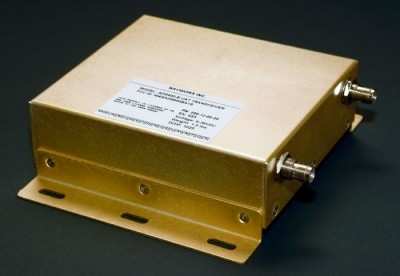
Now without the need for the TSO certification, the equipment manufacturers should be able to sell equipment for a little less. One manufacturer, so far, has taken this to an extreme. NavWorx will sell a UAT for $699 for a limited time for experimental aircraft. This device is ADS-B UAT in and out, with built in GPS.   The data can be connected RS-232, Bluetooth or WiFi to a display including mode manufacturers MFDs and Tablets.

It will need a couple antennas, one for the UAT and the other for the GPS. There will need some "baro" aiding, to allow accurate altitude reporting. The baro input can come from the transponder encoder if it includes RS-232 output, or can come from a specific NavWorx TransMonSPE device for another $169.

Hopefully this is the start of the flood, but in the mean time, this is certainly welcome news. I knew it was possible, and hopefully NavWorx will keep going offering even better devices, at reasonable prices.

You gonna buy one? I am pretty sure I will.


Saturday, January 10, 2015

Another SDR, and this one is interesting...

What have I been saying, ADS/B in and out for under $1000 is possible. There is a guy with an SDR transceiver that will work everywhere 100MHz to 1000Mhz! The Whitebox SDR is being developed and has a smaller following. This SDR has it's own processor on it and can do all the modulation/demodulation on board. The bill of materials for the board is about $300, making retail under $1000 quite possible.

The name is Whitebox as opposed to blackbox because everything about it is known. The more you know the more you can do with it! The source code, schematics and board layouts are on github. Unless you have looked into SDR programming, there may not be much useful there. If you have looked at gnu radio or any of the RTL-SDR programs, this should look quite similar.

The project hasn't changed status in a little over a year, although the author has done several recent interviews on some ham radio podcasts. There was quite a bit of discussion around the 2013 Dayton Hamvention. I believe this device is pretty solid, but I don't have one yet.

Remember that UAT frequency is 978MHz, toward the top end of the limit if this device. It should be no trouble to write the code for a UAT device. The USB out from this board could easily be connected to an external computer, including a tablet.

It will take some software development to finish this project, but with a little bit of work, suddenly there would be a UAT available for under $1000.

Flying Magazine recently published an article about a portable ADS/B in/out device that is under $1500. It may not be under $1000, but it has a chance to be a popular device. The SkyGuart TWX is a portable device that listens on both 1090 and 978MHz and transmits on the 978MHz. It also has GPS receiver and WiFi for connecting to a tablet.

Are we getting close yet?


Friday, December 12, 2014

Bluetooth or WiFi

Ever since I started the engine monitor project, I've had this nagging feeling in the back of my head about using Bluetooth for the engine monitor. Sure there are a lot of things that use Bluetooth for diagnostics and such on a smart phone. I rarely see anything permanently connected except car audio.

Bluetooth's biggest problem for this application comes with the idea of pairing. The only one (sometimes two) device can be paired with a tablet or phone. If you want to listen to audio from the tablet and get engine monitoring inputs to the same tablet, Bluetooth isn't the answer.

I've often thought that WiFi or USB might be a better solution. USB OTG is very common on most Android devices. OTG means the phone or tablet can be a host as well as a client. As a host, the phone can have a USB keyboard and mouse plugged in, and be useful (not portable though). Having the tablet or phone talking to the Arduino could be done for monitoring things, and using a USB hub, probably even charge while displaying engine settings.

USB's biggest drawback for this application is wire. There will need to be about 12 feet of USB cable from the front of the aircraft where the tablet would be to the back of the aircraft where the engine monitor would be (I have a Cozy that is a pusher). Putting a USB hub in the middle of the airplane would give me 2 six foot runs, but it still is inconvenient, and another point of failure.

WiFi, until recently, was a financial challenge. With Aurduino boards costing under $20 for what I want to do, and WiFi shields costing about $40 (sometimes they can be had for $30) it just didn't make sense. I am still trying to come up with a budget device that anyone can put in anything from a $10,000 homebuilt to a $500,000 production aircraft.

Recently a Chinese manufacturer has starting selling $3-5 wifi modules that will talk SPI and will run on the Arduino and other systems. The ESP8266 is available today for about $5. There are tutorialslibraries and sample applications for the Arduino. The module has an onboard processor that people are taking advantage of to make standalone projects, no Arduino required. It could be the thing that makes IoT a reality for many more consumer applications.

The module supports WiFi Direct (P2P) meaning I don't need a WiFi hub in the aircraft. The tablet or phone can talk directly with the module. If there is a hub in the aircraft, then that will work as well. It makes the whole wireless modules in the aircraft more of a reality.

I've ordered one of these modules, it may be a couple weeks before I get it. It will probably be a little while before I integrate it in the engine monitor as well. I'll keep you up to date on my progress.

Tuesday, December 2, 2014

I moved

I know, this blog seemed to go inactive for the past few months. I've been busy, but not specifically working on the engine monitor, but making it easier to work on it. I have a house where my family and I are all together, and it is near the airport, so I can get out to the plane to work on things when I get time. Of course setting up a house can take time, so that is what happened.


I've also upgraded phones. Still Android, I have the OnePlus that I got before they opened up buying to everyone. It seems to be a very nice phone, but I've had it less than a week, so I can't judge things too much. I tried to buy a Note4, but that process was fraught with challenges (some of it moving, some of it carrier store issues). I figure this phone ought to keep me happy for at least a year, and then I can look at the 64bit phones and see what they are like, or if I want one.

The convergence in the phones is really about to the limit. Right now the main features are battery life, camera and display. The displays are all about 1080p-450dpi. (yea, I know a comodore 64 could have 300dpi on a 1 inch screen).  Yes Apple came up with "retna" as the benchmark, but it is all about what you can see and are you happy. Heck I don't really watch movies on my phone, I use the tablet to do that, so do I need 450dpi, probably not. I'd rather have longer battery life on the phone, and a good display on a tablet.

My app has about 200 downloads. I'd say users, but even I am not using it very much right now. I don't know if anyone is using it, I am not seeing any crash reports or anything. I know the code is very robust, but I would think if people were using it, they would get in some state where it would crash once in a while.

The other thing I am working on is expanding the audience of this blog. It is fun writing, I just wish someone would let me know they like my opinions or not. So far I am getting nothing, but I will hopefully add to that. I'll let you know how when things are more firm. Just let me say that there is some traditional media working.

That is probably it for now. Feedback is more than welcome, help me serve you.